
Motorbike Listing
Add a bike
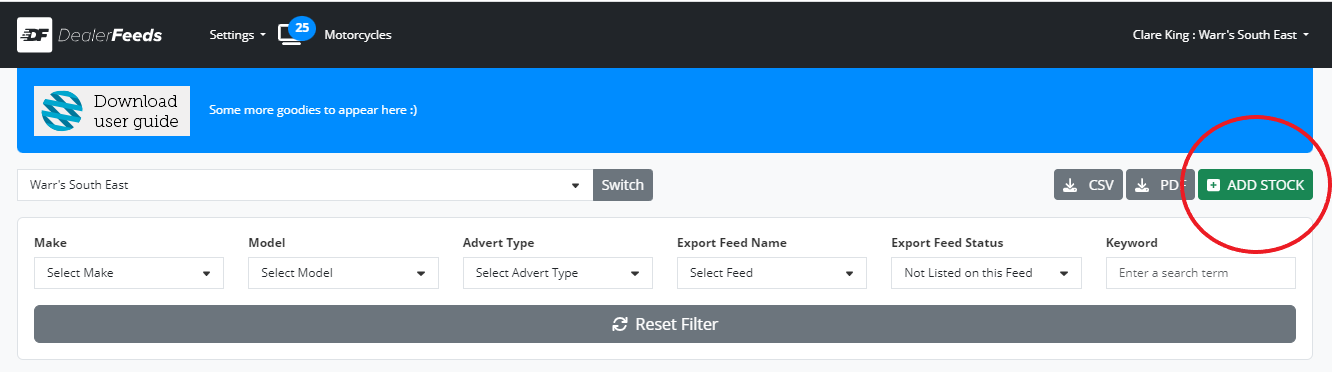
Once you’re logged into Dealer Feeds. click the Add Stock button on your vehicle listing page.
Required Information
The Required Information section must be completed for you to be able to publish a motorbike:
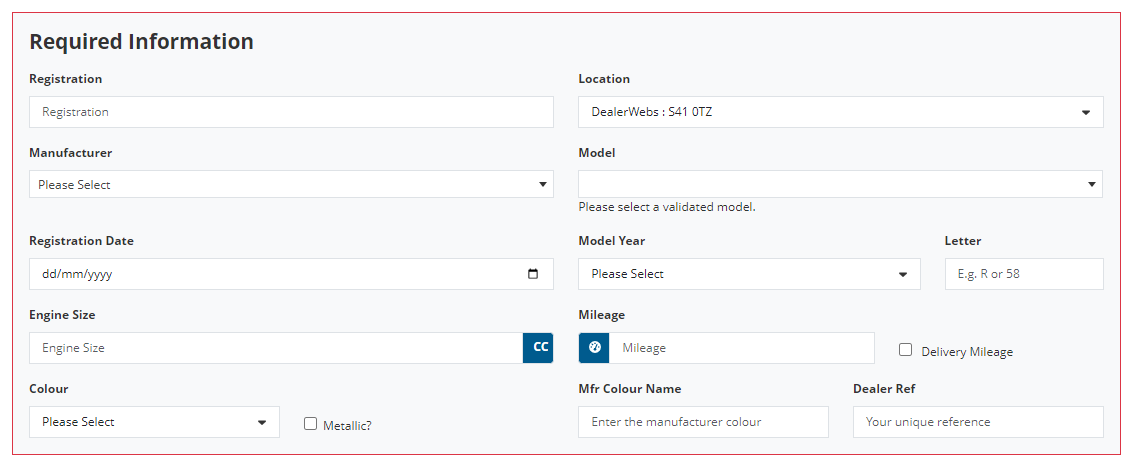
SCREENSHOT WILL NEED UPDATING
Registration
Enter the vehicle registration or leave blank if it has not yet been registered.
Location
If you have multiple locations to your dealership you can select which one you want to add the motorbike to.
Manufacturer and Model
Choose the Manufacturer and Model from the dropdown fields. If the option you want to select is not shown, click the Request a new manufacturer or model button:
ADD SCREENSHOT WHEN READY
Registration Date, Model Year and Letter
If you know the first registration date of the vehicle please enter it here. Please enter the model year and the plate’s letter/numeric reference of the registration period.
Fuel Type and Engine Size
This section of information will enable you to show whether your vehicle is petrol, diesel, electric, hybrid etc and record the size of its engine or power output in CCs or kW/hp DIN.
Mileage and Delivery Mileage
Enter here the mileage of the vehicle. If this include delivery mileage please tick the box.
Colour and Metallic indicator
Select the main colour of your vehicle. Tick the box if the colour is metallic. Type in the manufacturer’s colour name.
Dealer Ref
This is the unique reference you have in your dealership for this vehicle.